
Every app, every game, every website — someone wrote the code behind it!
So… What Exactly is Coding? 💻
Telling a computer what to do — step by step — in a language it understands!
Coding Means Giving a Computer Clear Instructions!
Coding means telling a computer what to do — step by step. A computer is incredibly fast but not smart on its own. It does nothing until someone gives it instructions. Those instructions? That is code! Every app, every game, every website — someone wrote the code behind it. And that person started exactly where you are right now.
The idea!
The code!
Every word!
Magic happens!
Every app, every game, every website — someone wrote the code behind it. And that person started exactly where you are right now. With zero knowledge and a lot of curiosity!
Your Robot Needs Super Clear Instructions!
Imagine a robot helper at home. It cannot guess — it only does exactly what you say. Fuzzy instructions? Total confusion. Clear steps? It nails it every time!
Too Fuzzy!
“Make something yummy for me.”
Robot has no idea what to do! 😕
Crystal Clear!
“Get bread. Spread butter. Toast for 3 minutes.”
Now the robot totally gets it! 🎉
When my first lines of code actually ran — I felt like I had cracked a superpower nobody told me about. You will feel that too! That moment changes everything.
What Does Real Code Actually Look Like?
The first time I saw code, it looked like alien symbols. Then my teacher showed me this — and everything changed!
# My very first line of code!
print("Hey there! Coding is awesome! 🎉")
Minecraft has millions of lines of code — but every single one started exactly like this. Small. Simple. One step at a time. Your journey starts the same way!
Why Should Kids Learn Coding? 🚀
5 real reasons — no boring lecture, promise!
Every Kid Who Learns Coding Gets These Superpowers!
Coding Builds Problem-Solving Skills
Coding teaches kids to break any big problem into tiny steps — just like solving a puzzle. I noticed this myself. The more I coded, the better I got at staying calm when things went wrong — not just in code, but in real life too!
It Helps Kids Do Better in School
Coding uses the same thinking patterns as math, reading, and science. Kids who code regularly tend to pay more attention in class. It is like secret brain training — but it feels nothing like studying!
Coding Builds Real Confidence
There is a very special moment every young coder experiences — when their code runs for the first time. That tiny win feels absolutely huge. I still remember mine. Kids go from feeling unsure to feeling completely unstoppable!
Future Careers Are Wide Open!
71% of new jobs in the next decade will require coding knowledge. Kids who start learning today are opening doors to game development, AI, robotics — and things we have not even invented yet!
What Can Kids Actually Build?
Once you learn the basics — you can build real things people actually use. Not pretend things. Real ones! Games, websites, apps, robots — the list is endless!
What is the Best Age to Start Coding? 🎂
Spoiler: there is no wrong age — but earlier is always more fun!
Every Age Has the Perfect Starting Point!
Preschoolers — No Screen Needed!
At this age, kids do not need a computer at all. Simple offline games teach the same thinking as real coding. Give your child a toy robot and say: “Walk three steps. Turn right. Stop.” That tiny game is coding logic in action!
Elementary Kids — The Perfect Starting Age!
This is the sweet spot for most kids. Children can use Scratch or block coding tools to build their first mini games — without typing a single line. I started around this age, dragging colorful blocks to make a cat move. It felt like pure magic!
Middle Schoolers — Computational Thinking!
This age group is incredibly capable. Kids at 11 and 12 can handle real logic, conditions, loops, and functions. I have watched 11-year-olds build simple calculators completely on their own. The jump to Python feels natural and exciting!
Teenagers — The Real Fun Starts Here!
Teens can go deep. Python, JavaScript, app development, even game engines. At 14, I built my first website. It looked absolutely terrible. But I was so proud of every broken pixel on that screen. That moment changed everything for me!
The best age to start coding is always right now — no matter how old your child is. Every concept builds on the last one. Start simple, stay consistent, and watch them grow! 🌱
Basic Coding Concepts Every Kid Should Know! 🧠
6 big ideas — explained simply, with real-life examples!
These 6 Ideas Power Every App and Game Ever Built!
Algorithm — The Step-by-Step Plan!
An algorithm is simply a step-by-step plan for solving a problem. Get one step wrong — and the whole thing breaks!
Making a birthday cake is an algorithm! Mix → bake → cool → decorate. Do it out of order and you get a mess!
Variables — Boxes That Store Info!
A variable is like a labelled box where your program stores information. Give it a name, put something inside, use it anytime later!
Your school bag is a variable called “bag”. Today it holds books. Tomorrow it holds a lunchbox. Same bag — different contents!
Loops — Repeat Without Rewriting!
A loop tells the computer to repeat something without writing the same line a hundred times. When I discovered loops, I felt like I had found a coding cheat code!
Brushing every tooth is a loop! Your brain says: “Do this action — for every tooth — until all are done.”
Conditions — Code That Decides!
Conditions let your code make decisions. If something is true — do this. If not — do that instead. This is how apps behave differently for different users!
If it is raining → take an umbrella. Else → wear sunglasses. Your brain runs if/else conditions every single morning!
Functions — Reusable Code Blocks!
A function is a reusable block of code with a name. Write it once — call it anywhere you need it. Saves time and keeps code clean!
Washing hands is a function! Turn tap on → soap → scrub → rinse → dry. You run this function many times a day!
Debugging — Find and Fix Mistakes!
Debugging means finding and fixing mistakes in your code. Every single coder debugs — from beginners to experts. Making mistakes is not failing. It is literally how coding works!
Think of it like finding a lost toy in a messy room. You search step by step until you spot it — then fix it and move on!
Algorithm — your step-by-step plan
Variables — boxes that store info
Loops — repeat without rewriting
Conditions — code that decides
Functions — reusable code blocks
Debugging — find and fix mistakes
Best Coding Languages for Kids! 🧑💻
Pick one and start — all of them are beginner-friendly!
5 Languages — Each Perfect for a Different Kid!
Scratch — No Typing Needed!
Scratch is where almost every young coder begins. Drag and drop colorful blocks like LEGO to build games and animations. No keyboard typing, no confusing symbols. Made by MIT — completely free forever. Watching a cartoon cat dance across the screen? Pure magic!
Block Coding — Snap It Together!
Block coding uses visual puzzle pieces you snap together — like toy bricks. Even 5-year-olds pick it up on the very first try. Tools like Code.org and Blockly teach real coding logic — loops, conditions, sequences — without a single confusing symbol!
Python — Reads Like Plain English!
Python is the most beginner-friendly text-based language in the world. It reads almost like normal English sentences. One line prints a message. Two lines build a calculator. Most schools worldwide teach Python as the very first real language!
JavaScript — Make Websites Come Alive!
JavaScript is the language that makes websites click, move, and react. Teens love it because results show up instantly inside the browser. Change a button colour with three words of code. The instant result feels incredibly satisfying!
Minecraft Coding — Learn While Playing!
Kids already love Minecraft — so why not code inside it? Minecraft Education Edition lets children write real code to place blocks, build machines, and solve puzzles. It never feels like studying. That is the best kind of learning!
Not sure which one to pick? Start with Scratch if your child is under 10. Move to Python when they are ready for real typing. Every great coder started with just one language — and built everything else from there!
Fun Ways to Teach Coding to Kids! 🎉
Learning to code does not have to feel like studying — trust me!
4 Ways Kids Learn Coding Without It Feeling Like Work!
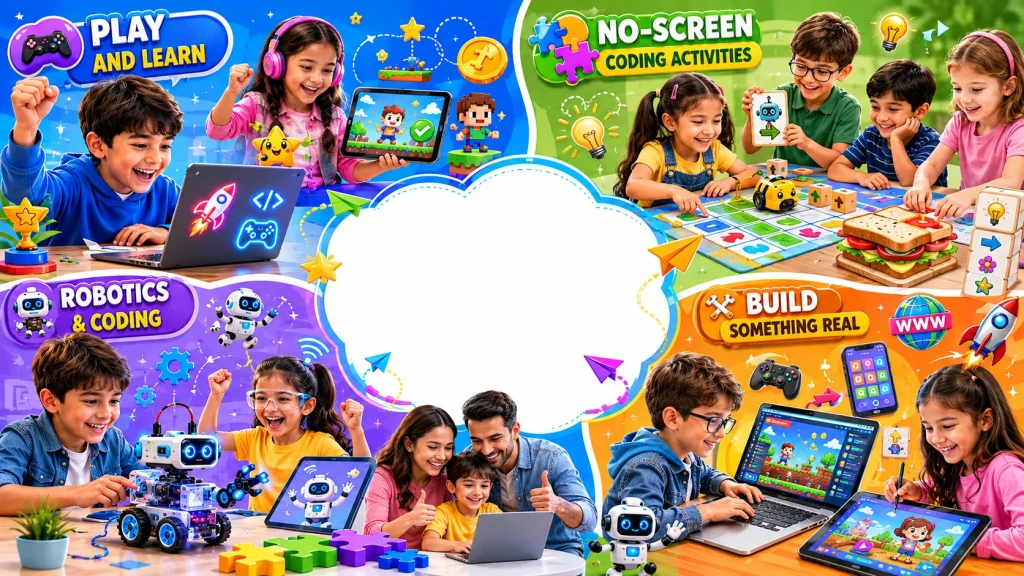
Play and Learn
Games make kids forget they are even learning. Every level teaches a new concept automatically!
⚡ Lightbot | ⚔️ CodeCombat | 🎯 Tynker | ⛏️ Minecraft
No Screen Needed
Yes — coding without a computer is completely real! Offline activities teach the exact same thinking skills!
🤖 Robot game | 🥪 Sandwich algorithm | 🐭 Code & Go Mouse
Robotics
Kids write code — the robot moves. That instant reaction creates pure excitement every single time!
🟡 LEGO Spike | 🔵 Ozobot | 🟢 Dash Robot | 🔴 mBot
Build Something Real
The best way to learn is to build something real. Even a tiny project makes a kid feel like a proper developer!
🎮 Scratch game | 🌐 Webpage | 🧮 Calculator | 📖 Story
My honest tip for every parent — do not force it. Let kids pick what excites them. When they choose their own project — they stay with it. Curiosity is always the best teacher! 🌱
Best Free Platforms for Kids to Learn Coding! 🛠️
All tested, all beginner-friendly — most are completely free!
6 Platforms That Kids and Parents Love!
Scratch
My top pick for every young beginner. Drag-and-drop blocks, zero typing needed. Kids build real games in minutes. Made by MIT — completely free forever!
Code.org
Fun coding courses packed with games and puzzles. Used by millions of kids worldwide. No account needed to start. Perfect first stop for total beginners!
Khan Academy
Free coding lessons with clear video explanations at every step. Great for kids who like learning at their own speed. Instant feedback keeps kids hooked!
Tynker
Game-based coding that kids genuinely beg to do more of. Block coding to Python — all inside fun story-driven challenges. One of my personal favourites!
Lightbot
Guide a tiny robot through puzzles using code-like commands. No typing, no reading needed. Even 4-year-olds get it on the very first try. Pure logic wrapped in a fun game!
Codecademy
Older kids and teens love this. Real Python, JavaScript, and HTML lessons with instant feedback. Type code — see results — feel like a real developer!
Start free — always! Scratch + Code.org is the perfect combo for most beginners. Pick one, stick with it for 2 weeks, and watch your child go from confused to confident! 🚀
Real Benefits of Coding for Kids! ✨
It is not just about computers — it changes how kids think!
5 Life Skills Every Coding Kid Builds!
Problem-Solving — Break Big Problems Into Small Steps
Coding teaches kids to face any problem without panicking. They learn to slow down, break things apart, and fix one small piece at a time. I used to freeze when things went wrong. Coding completely changed that habit for me.
Creativity — Kids Create, Not Just Consume Technology
Coding gives kids a blank canvas to make anything real. A girl I knew built an entire birthday card app for her mum using Scratch. Her mum cried. That is creativity plus coding — and it feels magical every single time!
Confidence — Every Working Line of Code Feels Like a Win
There is a moment every young coder experiences — when their code runs for the very first time. That tiny win feels enormous. I still remember mine. Kids go from unsure to completely unstoppable — one small working project at a time!
Logical and Computational Thinking
Coding trains kids to think in sequences, patterns, and conditions. This is called computational thinking — and it is one of the most valuable skills a child can build. It applies far beyond coding into every subject they will ever face!
How Coding Helps Kids in School Subjects
Coding quietly improves performance across every subject. Math feels easier. Reading improves through careful instruction-following. Kids who code regularly show stronger focus and better results across the board!
Fun Facts About Coding Kids Will Love! 🤩
Real stories — mind-blowing, inspiring, and totally true!
4 True Stories That Will Inspire Every Young Coder!
The First Computer Programmer Was a Woman — Ada Lovelace
Ada Lovelace was a mathematician who wrote the world’s very first algorithm — for a machine that had not even been built yet. She saw what computers could do before anyone else did. Every coder alive today is walking a path she started over 200 years ago!
🏆 First programmer in historyWhy Do We Call Coding Mistakes “Bugs”?
In 1947 — a real moth got stuck inside a computer and caused it to crash. Engineers taped it into their notebook and wrote: “First actual case of bug being found.” That is where the word “bug” in coding comes from — a real insect!
🐜 A real bug started it allElon Musk Taught Himself Coding at Age 12
No coding class. No tutor. Just a book, curiosity, and determination. By 12, Elon had built and sold a video game called Blastar for $500. That same curiosity took him to Tesla and SpaceX. Every kid with a free platform has exactly what he started with!
🚀 From age 12 to SpaceXMinecraft and Roblox Were All Made With Code
Every game your child loves — every world, every character, every sound effect — was built line by line with code. The developers who built Minecraft were once kids who knew nothing about coding. They learned, they built, and they created something 140 million people play every month!
🌍 140M players — all from codeFAQs — Coding for Kids 🙋
Real questions parents and kids ask — honest answers below!
What age should a child start coding?
Honestly? There is no single right age. Kids as young as 3 can start with simple offline logic games. By 6, most children are completely ready for block coding tools like Scratch.
💡 The best age to start is always right now. Early starters build a real advantage — not just in tech, but in how they think and solve problems every single day!
How can I teach my kid coding?
You do not need to be a developer yourself. Plenty of parents with zero coding background have helped their kids start and thrive. Here is what actually works!
✅ Start with Scratch or Code.org — free, no setup needed. ✅ Sit with them for the first session — make it fun. ✅ Celebrate every small win — even “Hello World!” deserves a high five! 🙌
Which app is best for coding?
It depends on your child’s age. For young beginners, Scratch and Code.org are the top picks — both free, both beginner-friendly. For older kids ready for real code, Python on Tynker or Codecademy works brilliantly.
🐱 Under 10? → Start with Scratch (scratch.mit.edu). 🎮 Age 8–14? → Try Tynker or Code.org. 🧑💻 Age 13+? → Codecademy or Khan Academy!
How can I teach my child coding at home?
Teaching coding at home is easier than most parents think. You do not need special equipment — just a laptop, a free platform, and 30 minutes a few times a week!
🌱 Start with screen-free logic games for young kids. 💻 Move to Scratch for first real coding sessions. 🎯 Pick one small project — a quiz, a game — and build it together. 🏆 Let your child teach YOU what they made!
Did Elon Musk teach himself programming?
Yes — and this is one of my favourite coding stories to share with kids and parents! No class. No tutor. Just a book and curiosity. Any kid with Scratch or Code.org has more tools than Elon ever started with!
⚡ Age 12 — started coding. 3 days to learn 6 months of content. Sold first game for $500. Just one book. The only question is — will they start? 🌟